- Extract h2.jar into the folder (say c:\h2-jar-extract)
- Run the following script from the command prompt (example: c:\h2-jar-extract>java org.h2.tools.Script -url jdbc:h2:<path>\<your .mv file> -user <username usually sa> -script h2-dump.zip -options compression zip)java org.h2.tools.Script -url jdbc:h2:<path>\<your .mv file> -user <username usually sa> -script h2-dump.zip -options compression zip
- Extract h2-dump.zip , hurray you can find the scripts in it.
Sunday, 31 May 2015
Steps to Generate SQL scripts & Backup the H2 database (Using h2 jar)

Tuesday, 27 January 2015
How to configure and run Apache Pluto in Eclipse
- Download apache pluto from http://portals.apache.org/pluto/download.html or http://archive.apache.org/dist/portals/pluto/
- In Eclipse choose server from WindowPreferences Server.
-
Choose Apache TomcatV7.0 as provided below

- Provide the folder where you have the unzipped version of Apache Pluto as Tomcat installation directory. Ex: pluto-2.0.3-bundle\pluto-2.0.3\

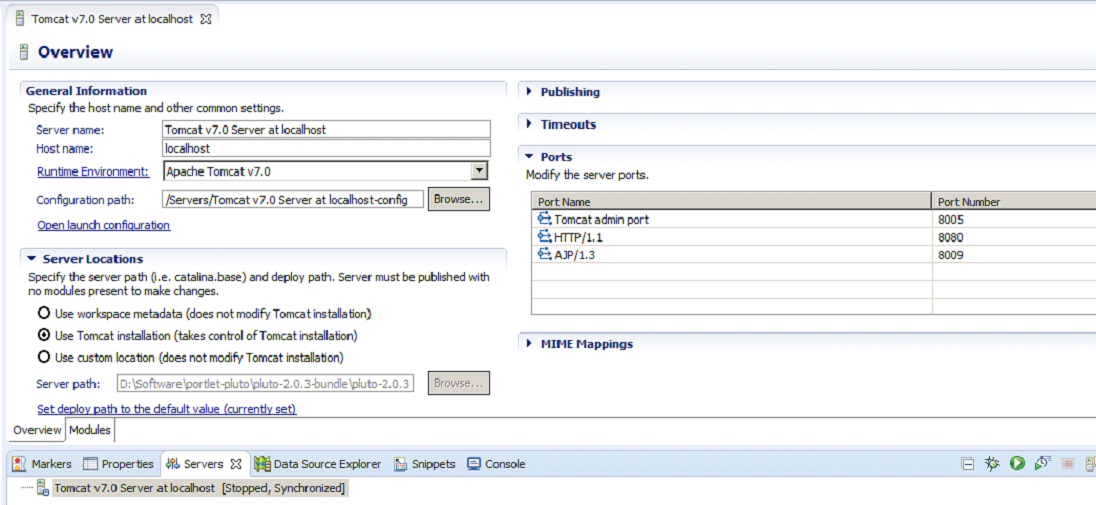
<!--
<role rolename="tomcat"/>
<role rolename="role1"/>
<user username="tomcat" password="tomcat" roles="tomcat"/>
<user username="both" password="tomcat" roles="tomcat,role1"/>
<user username="role1" password="tomcat" roles="role1"/>
-->
<!--
<user name="tomcat" password="tomcat" roles="tomcat,pluto,manager"/>
<user name="pluto" password="pluto" roles="pluto,manager"/>
-->
<role rolename="pluto"/>
<role rolename="tomcat"/>
<role rolename="role1"/>
<user username="tomcat" password="tomcat" roles="tomcat,pluto,manager"/>
<user username="role1" password="tomcat" roles="role1"/>
<user username="both" password="tomcat" roles="tomcat,role1"/>
<user username="pluto" password="pluto" roles="pluto,manager"/>
-
provide Username/Password as pluto/pluto.
voila you have setup the apache pluto in Eclipse.
Monday, 14 April 2014
Creating your own Signed Jar in Java
Creating your Own Certificate , Keystore file, signing the jar using jarsigner & verifying.
#To Generate keystore file.
keytool -genkey -alias <your keystore alias name> -keyalg DSA -keystore <your keystore name>
#To create your own self signed certificate and binding with the keystore file
keytool -certreq -keyalg DSA -alias <your keystore alias name> -file <your certificate request.csr> -keystore <your keystore name>
#To make a signed jar
jarsigner -keystore <your keystore name> <your jar name> <your keystore alias name>
#To verify the signed jar
jarsigner -verify -verbose -keystore <your keystore name> -certs <your jar name>
#To Generate keystore file.
keytool -genkey -alias <your keystore alias name> -keyalg DSA -keystore <your keystore name>
#To create your own self signed certificate and binding with the keystore file
keytool -certreq -keyalg DSA -alias <your keystore alias name> -file <your certificate request.csr> -keystore <your keystore name>
#To make a signed jar
jarsigner -keystore <your keystore name> <your jar name> <your keystore alias name>
#To verify the signed jar
jarsigner -verify -verbose -keystore <your keystore name> -certs <your jar name>
Saturday, 6 April 2013
Junit-3
TestCase- class should be inherited for the
test case class where all the method starts
with testX(),testY()
TestSuite- class should be inherited
public class XTest extends TestCase {
public File file;
public XTest(File file) {
super(file.toString());
this.file = file;
}
public void testX() {
fail("Failed: " + file);
}
}
public class XTestSuite extends TestSuite {
public static Test suite() {
TestSuite suite = new
TestSuite("XTestSuite");
File[] files = new
File(".").listFiles();
for (File file : files) {
suite.addTest(new
XTest(file));
}
return suite;
}
}
Junit-4
@RunWith(Parameterized.class)- class should
be annotated like this
@Parameters -parameter method should be
annotated and the method signature- public
static Collection<Object[]>
getFiles(){}
@Test- should be given for methods
import org.junit.Test;
import org.junit.runner.RunWith;
import org.junit.runners.Parameterized;
import
org.junit.runners.Parameterized.Parameters;
@RunWith(Parameterized.class)
public class TestY {
@Parametererized.Parameters
public static Collection<Object[]> getFiles() {
Collection<Object[]> params = new
ArrayList<Object[]>();
for (File f : new
File(".").listFiles()) {
Object[] arr = new Object[] {
f };
params.add(arr); }
return params;
}
private File file;
public TestY(File file) {
this.file = file;
}
@Test
public void testY() {
fail(file.toString());
}
Tuesday, 2 April 2013
Java5.0 - Generics
Purpose of Generics:
To make object type checking for java collection at compile time.
Ex: List<E> list = new ArrayList<E>();
E denoted the type.
List<Integer> list = new ArrayList<Integer>();
Pros :
Ø It provide abstraction over types
Class,interface,method can be parametrized by Types.
Ø It makes type safe code possible
To avoid ClassCastException at runtime.
Ø It provides readability.
Ø Inheritance relationship between generic classes themselves still exists.
Ex: List<Integer> list = new ArrayList<Integer>();
Ø Entries in a collection maintain inheritance relationship.
Ex: ArrayList<Number> list = new ArrayList<Number>();
list.add(new Integer(10));
list.add(new Long(20L));
Ø Use of Wildcard type arugument.
Collection<?> means collection of unknown type.
Ex: void printValues(Collection<?> coll){
for(Object o:coll){
s.o.p(o);
}
}
Collection<String> collStrings = new ArrayList<String>();
printValues(collStrings);
Collection<Integer> collIntegers = new LinkedList<Integer>();
printValues(collIntegers);
Ø Use of Bounded wildcard.(bound the unknown type to be a subtype of another type)
Ex: void printValues(Collection<? extends Number> coll ){
}
Collection<Integer> collIntegers = new LinkedList<Integer>();
printValues(collIntegers);
Collection<Long> collLongs = new LinkedList< Long >();
printValues(collLongs);
Ø Type erasure – generic type information are removed in the resulting byte-code after compilation. So it becomes a RawType.
Ex: List<Integer> list; will converted to List list;
Ø Creating own generic class.
Public class Car<S,I>{
S s;
I i;
public Car(S s,I i){
s=s;
i=i;
}
}
Car<String,Integer> car1= new Car<String,Integer>(“RollsRoyce”,new Integer(007));
Cons:
Ø It does not allow subtyping because ClassCastException might occur at runtime.
Ex: ArrayList<Object> list = new ArrayList<Integer>();
Ø There is no inheritance relationship between type arguments of a generic class.
Subscribe to:
Posts (Atom)